The change cutoff
When members can no longer change a delivery, and what happens to late skips, pauses and cancellations.
Once you start harvesting, cooking or packing for a delivery, it needs to stop changing. The change cutoff is the moment a delivery locks. Before it, members can skip, pause, cancel, swap and add to that delivery from the member portal. After it, the delivery shows Locked and goes out as planned.
Set your cutoff
- Go to Copia → Share Types and click Configure on a share type.
- Under Change cutoff, set Cutoff (days before delivery).
- Pick Locks at (farm time): the time of day the delivery locks. It’s 12:00 AM (midnight) unless you change it.
- Click Save.
Each share type has its own cutoff. A line under the fields spells it out, for example “A Tuesday delivery locks at the start of Saturday (midnight).”
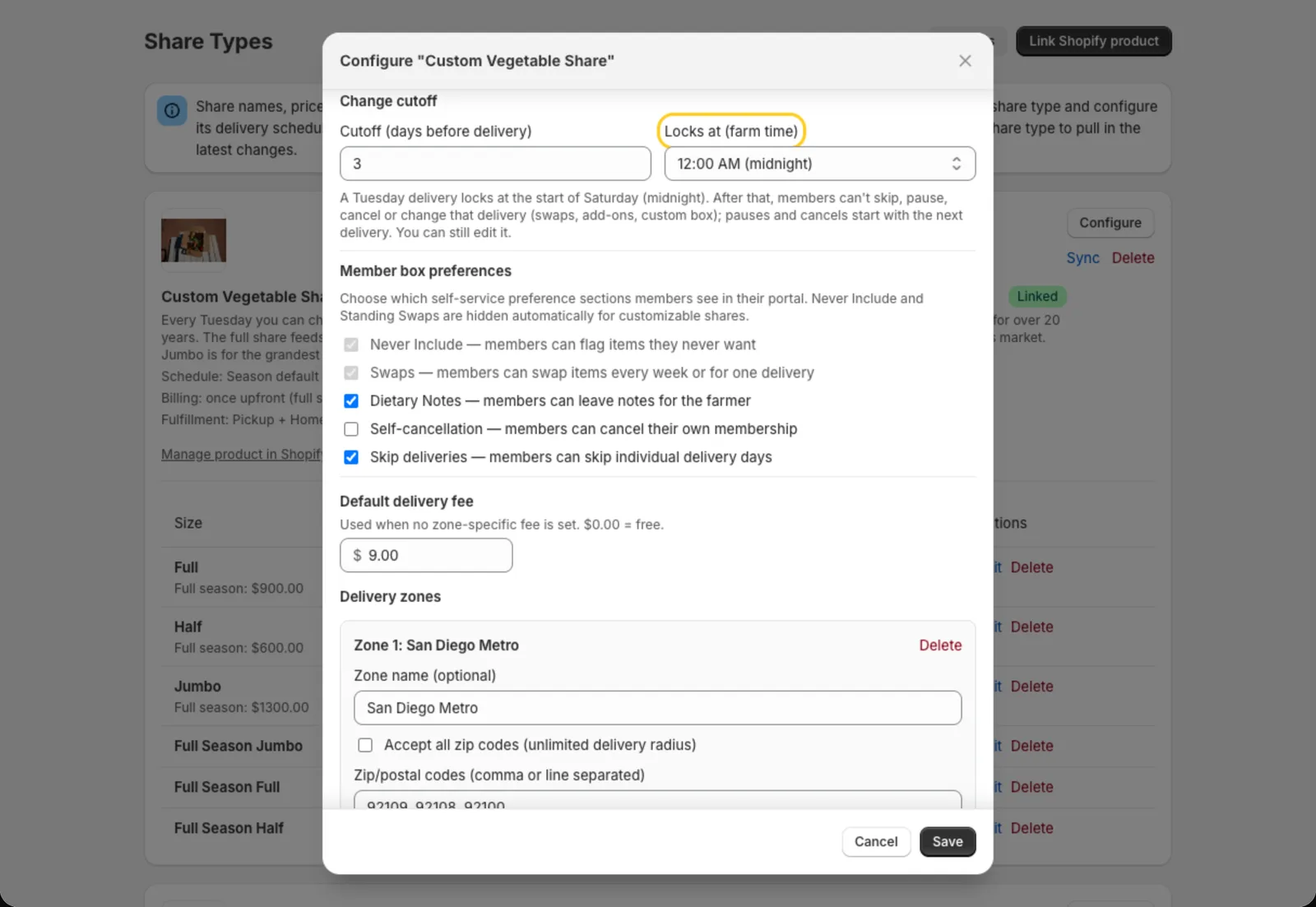
The cutoff counts calendar days in your farm’s timezone (Settings → Farm timezone), not hours. With a cutoff of 3 days at midnight, a Tuesday delivery locks as Saturday begins. Members can still change it all day Friday. Pick a later Locks at time, like 6:00 PM, to give them most of Saturday too. A cutoff of 0 days at midnight locks the delivery as delivery day begins.
What members can do
| Before the cutoff | After the cutoff | |
|---|---|---|
| Skip a delivery | Yes | No. It shows Locked. |
| Unskip a delivery | Yes | No |
| Pause | Yes | The delivery still goes out and is billed. The pause starts with their next delivery. |
| Cancel | Yes | The delivery still goes out and is billed. The cancellation starts after it. |
| Add or remove a one-time add-on | Yes | No |
| Swap an item for one delivery | Yes | The swap goes to their next delivery instead. |
| Build their box (customizable boxes) | Yes | No |
| Add, change or remove a recurring add-on | Yes | Starts with their next delivery. |
| Change an Every week swap or Never include | Yes | Starts with their next delivery. |
You aren’t limited by the cutoff. From a member’s page you can still skip, unskip, pause or edit any delivery, and check-in works as normal.
Late pauses and cancellations
A member can still pause or cancel after the cutoff. It just starts with their next delivery. Before they confirm, the portal tells them, for example:
Your Tue, Oct 13 box is locked, so it will still be delivered and billed. Your pause starts Tue, Oct 20.
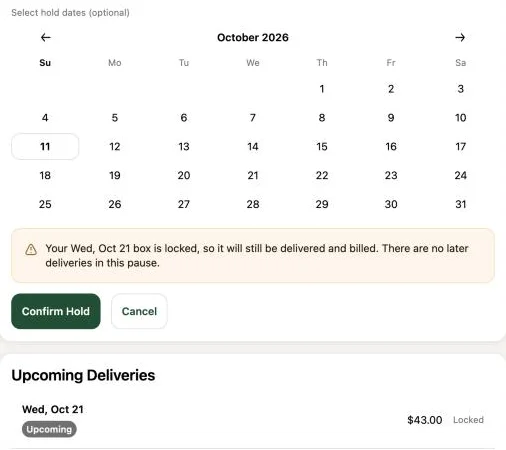
The locked box stays on your pack list and delivery route, and it’s billed as usual. The member still gets the “what’s in your box” email for it, even after pausing or cancelling. If the season gives credit for paused weeks, it covers only the deliveries that were actually paused.
Invoiced but not paid yet
If you bill members by invoice, a delivery can be invoiced before it locks. Until the cutoff, members can still change their mind about it:
- Skipping, pausing or cancelling removes the delivery and cancels its unpaid order. No credit is added, since nothing was paid.
- If one order covers several deliveries, Copia leaves that delivery for you to sort out. A member who tries to skip it is asked to contact you, and a pause or cancellation leaves it in place, with a note in their activity log. Skip it from their member page if needed.
Once the delivery locks, the invoice stands. The box goes out and the member still owes it, even if they pause or cancel afterwards.
Tip: Send delivery notifications before the cutoff. Their swap button tells members the deadline (“Swap an item before Sat, Oct 10”) and disappears once the delivery locks.
Tip: When you run billing decides how final your invoices are. If you bill 5 days ahead with a 3-day cutoff, members have 2 days to skip or pause an invoiced box. To make invoices final, run billing after the cutoff.
Ongoing preferences
Recurring add-ons, Every week swaps and Never include items carry over from box to box. When a member changes one after a delivery locks, the change starts with their next delivery. The locked box goes out with what it had. After saving, the portal tells them, and it shows the date next to the setting:
Saved. Starts with your Tue, Oct 20 box. Earlier boxes are already locked or billed, so they stay as they were.
Add-ons also wait for billing. A delivery that’s already paid, invoiced or being billed keeps the add-ons it was billed for, even before it locks. So members are never charged for an add-on that wasn’t in their box, and their box always matches what they paid for. This applies when you change an add-on from a member’s page too. Copia then tells you which delivery the change starts with.
Dietary notes aren’t tied to a delivery. They print on the next pack list, even for a locked box.
Changing a member’s pickup location or delivery address applies right away, including to a locked box.